
On this page
What search engine optimization is
The visits it earns are free in the sense that you don’t pay per click. They aren’t free to earn: they come from technical care, useful content and a reputation other sites recognize.
It matters because search is still how most people start looking for a product, a service or an answer. A page that ranks keeps bringing visitors for months or years after the work is done, which no ad can do. And a site that is hard for Google to read usually has the same problems for people: slow pages, broken links, headings that don’t say what the page is about.
How Google gets from your site to a search result
Every search engine works in roughly the same three steps, and each one is a place where a site can fall down.
Most SEO advice skips straight to step three. In practice the biggest wins on a small or neglected site are usually in steps one and two:
A page Google can't crawl or index can't rank however good it is.
The three parts of SEO
What has changed with AI answers
Google’s AI Overviews, ChatGPT, Gemini, Perplexity and Claude now answer many questions directly, often citing a handful of pages as sources. That changes what “ranking” means. You can be named in an answer without being linked, or linked as a source without being named. Assistants generate their answers fresh each time, so one check is one sample, not a settled position.
What earns a place in those answers is the same work that earns a ranking: pages that answer a real question plainly, that a crawler can fetch without running scripts, with accurate structured data and a reputation other sites confirm.
There is no published formula for AI citations, and anyone selling one is guessing.
How to check your own SEO
You can get a good picture of your site’s SEO in an afternoon with free tools.
- Start with Google Search Console.
Verify your site, then look at three reports. Performance shows the searches you appeared for, how often you were shown (impressions), how often people clicked, and your average position over the period. Pages (under Indexing) shows which pages Google has indexed and why the others aren't. Sitemaps shows whether Google could read yours. Remember that impressions are not search volume: an impression means your site appeared, not how many people searched.
- Then crawl your site.
A crawler reads every page the way a search engine does and lists what's wrong: missing titles, broken links, redirect chains, pages with no internal links in. Doing this by hand on more than a dozen pages is impractical.
- Check speed on your most important page.
Google's PageSpeed Insights runs Lighthouse in a lab and, when your site has enough visitors, shows real-visitor data from Chrome. Treat the two separately: the lab number is repeatable, the field data is what Google's ranking systems use.
- Search for what you sell.
Search the five or ten phrases a customer would use, in a private window, and note where you appear. Do the same for your competitors. One check is one sample, since results vary by place and device, but it tells you who you're up against.
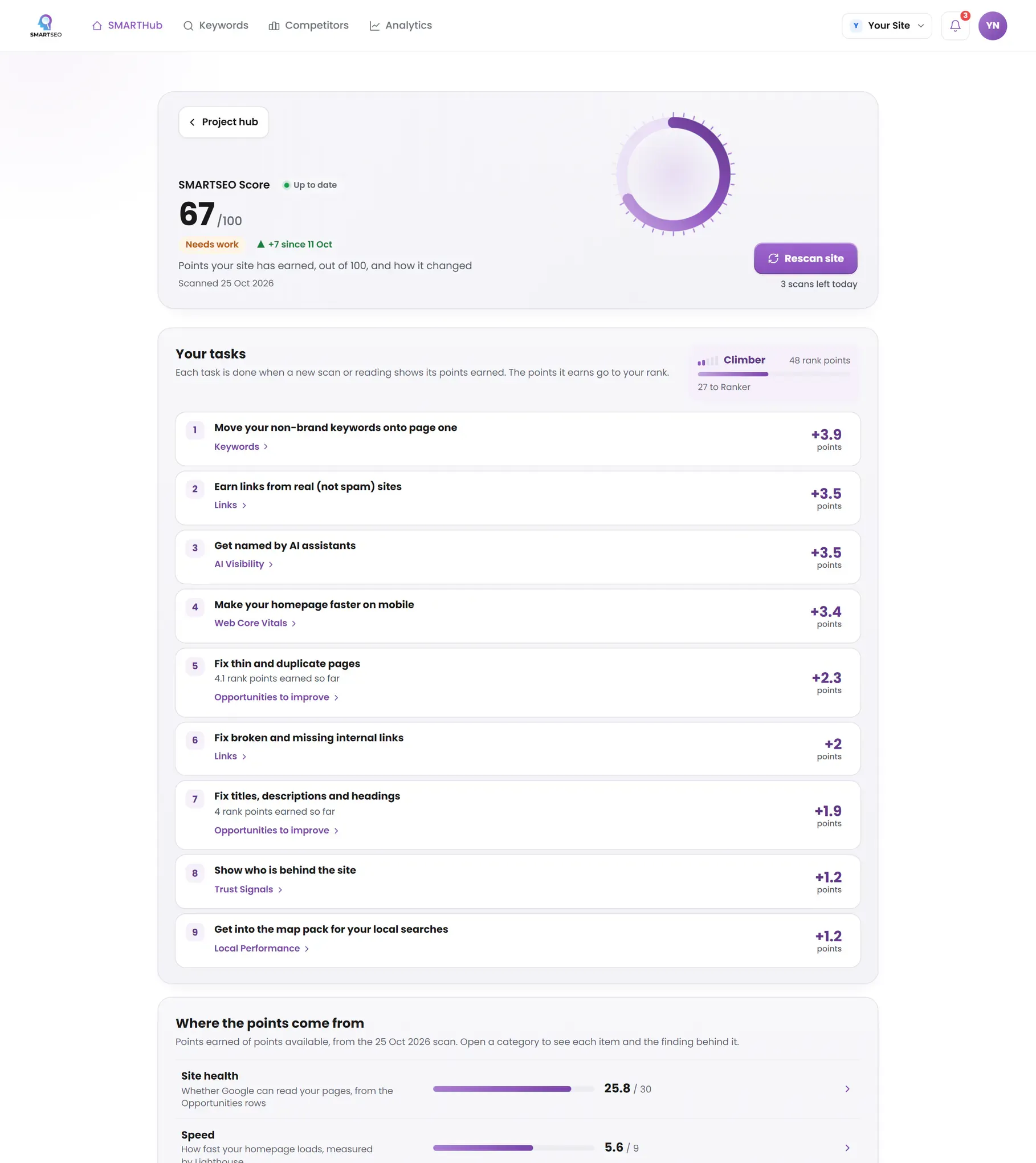
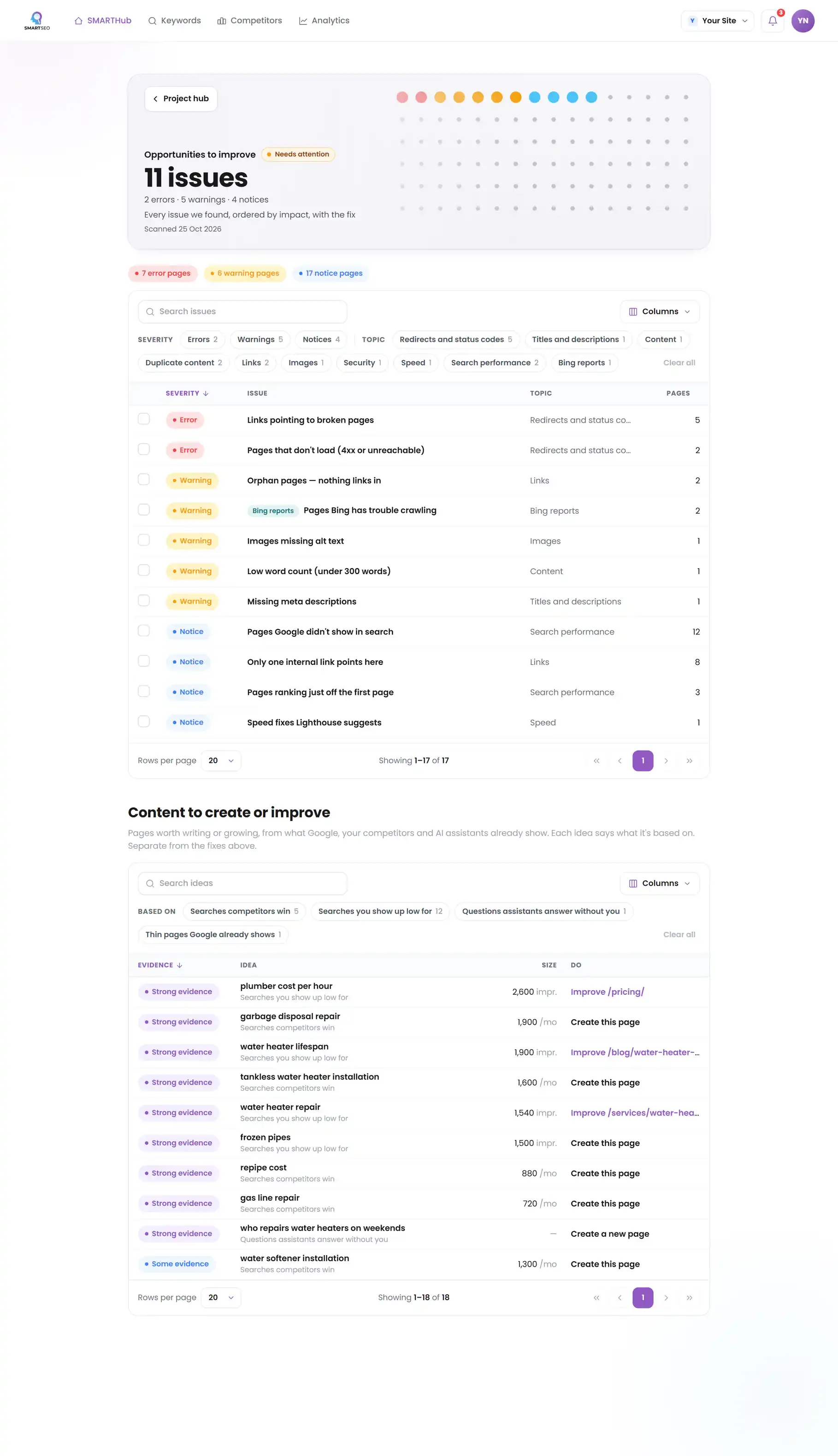
Or let SMARTSEO do all of it. SMARTSEO crawls your site, reads Search Console and Analytics if you connect them, checks your rankings every week and compares you with the competitors you name. It turns all of that into one SMARTSEO Score and a list of Opportunities ordered by impact, each with the pages affected and how to fix it. A rescan confirms the fix.
Where to start when everything needs work
Fix in this order, because each step makes the next one count:
- Anything that stops Google crawling or indexing pages you want found: a site-wide robots.txt block, a stray noindex, broken pages, redirect loops.
- Pages that compete with each other: duplicate titles and near-identical content split your relevance between two addresses.
- Titles and descriptions on the pages that already get impressions, especially those sitting just off page one, where a better title can move you up and win the click.
- Content gaps: searches your competitors rank for and you don’t. These take longest, so start them early.
Before and after: a missing title
Example for illustration; not a client's data.
The sections of this site go deeper into each part: an SEO audit for the technical checks, enterprise SEO for large sites, and local SEO for businesses customers visit.
The problems we find most often
Each of these is a check SMARTSEO runs on every scan, in the words the app uses. Open one to see what triggers it and how to fix it.
ErrorMissing page titles
- What triggers it
- A page has no <title> tag, or an empty one.
- Why it matters
- Titles are the single strongest on-page signal Google reads for Experience and relevance. Pages without one are judged on body text alone.
- How to fix it
- Add a unique <title> of 50–60 characters to each page, leading with the primary keyword and ending with your brand.
ErrorDuplicate titles
- What triggers it
- Two or more pages share exactly the same title.
- Why it matters
- Duplicate titles confuse Google about which page to rank, splitting authority between them.
- How to fix it
- Give each page a distinct title that reflects its unique intent, or consolidate near-identical pages.
WarningMissing meta descriptions
- What triggers it
- A page has no meta description.
- Why it matters
- Google often uses the meta description as the snippet under your title. Without one it picks text from the page, which may not describe it well; it's optional, so it won't stop the page ranking.
- How to fix it
- Write a one-sentence summary of each page, about 120–155 characters, that says what it offers.
WarningLow word count (under 300 words)
- What triggers it
- A live page has fewer than 300 words of text.
- Why it matters
- Thin pages struggle to demonstrate the Expertise the Helpful Content system rewards.
- How to fix it
- Expand to genuinely useful depth (aim for 600+ words on key pages) or consolidate thin pages into one stronger page.
ErrorLinks pointing to broken pages
- What triggers it
- A live page links to one of your addresses that is broken.
- Why it matters
- Visitors who click these links land on an error, and Google's crawler wastes a visit on a page that isn't there.
- How to fix it
- Update or remove each link, or redirect the broken address to its replacement.
NoticeNoindex pages
- What triggers it
- A page asks search engines to leave it out, in its robots meta tag or a server header.
- Why it matters
- Some noindex tags are deliberate; others quietly hide pages you want people to find.
- How to fix it
- Confirm each noindex is intentional and remove it from any page that should appear in search.
WarningNo XML sitemap found
- What triggers it
- We couldn’t find an XML sitemap in robots.txt or at the usual addresses.
- Why it matters
- A sitemap lists the pages you want Google to find. It isn't required, but it helps Google find new and deep pages.
- How to fix it
- Publish /sitemap.xml and add a Sitemap: line for it to robots.txt.
NoticePages ranking just off the first page
- What triggers it
- A page’s average position in Search Console is between 8 and 20.
- Why it matters
- On average Google shows these pages around positions 8 to 20, at the bottom of the first page or on the second, where few people look. A little more relevance or a few more links can move them up.
- How to fix it
- Make the page more complete for what people search, and link to it from your related pages with descriptive link text.
Our own site, before this rebuild
We ran SMARTSEO on smartseo.dev while it still ran on WordPress, and the result is the reason this page exists. The site's technical health was decent: most of its Site health points were earned. Search was another story. None of the non-brand keywords we track reached Google's top 100, so the Keywords part of the Score earned nothing.
SMARTSEO’s own project for its own site, read from stored data on October 28, 2026.
That is the most common shape we see: a site that works, with pages that don't answer any search well enough to rank. The fix was not more plugins. It was rewriting every page around one topic it can teach properly, which is what you're reading.
In this section
- Enterprise SEO ServicesSEO for large sites, where one template mistake repeats on thousands of pages.
- Local SEO ServicesShowing up in Google Maps and local results near your customers.
- SEO AuditA technical audit: can Google reach, read and trust every page?
- SEO ServicesOn-page SEO: titles, descriptions, headings, links and images.
Questions people ask
How long does SEO take to work?
Technical fixes can show within weeks, because Google only has to recrawl the pages. Content and authority take longer: a new page often needs a few months to settle into its position, and competitive searches take longer still. Anyone who promises page one by a date is guessing.
Is SEO still worth it now that Google shows AI Overviews?
Yes, but the target has widened. AI Overviews and assistants like ChatGPT build their answers from pages they can fetch and understand, so the same work that earns a ranking makes you citable. Clicks for simple questions are falling; clicks for decisions, comparisons and local services still go to websites.
What is the difference between SEO and SEM?
SEO earns unpaid visits from the organic results. SEM usually means paid search: ads you bid on, which stop the moment you stop paying. Most businesses do best with both, using paid search to test which searches convert and SEO to win them for free over time.
Can I do SEO myself?
Much of it, yes. Titles, descriptions, headings, internal links and content are all in your hands on most platforms. The harder parts are knowing what to fix first and spotting problems you can't see in the page itself, such as a server header that hides a page from Google. That is what SMARTSEO is for.
Do I need to submit my site to Google?
Not as such. Google finds sites by following links. Verifying your site in Google Search Console and submitting a sitemap there helps Google find new pages sooner, and gives you the only first-hand data Google offers on how you appear in search.
What we do for you
- A full audit of your site with a plan ordered by impact
- Technical fixes: redirects, canonicals, sitemaps, robots.txt and structured data
- On-page rewrites of titles, descriptions, headings and content
- A keyword strategy built from your Search Console data and your competitors' rankings