
On this page
What web analytics is
It measures where visitors come from, which pages they land on, what they do next, and whether they take the actions you care about: buying, booking, calling, filling in a form.
Without clean tracking, every other decision is a guess.
It matters because almost every marketing question ends in it. Did the redesign help? Which campaign brought customers, not just clicks? Did the new page win the traffic it was written for? Each of those has an answer only if the data behind it is right.
The tools and how they fit
Most sites today use three parts that hand data to each other. Knowing which part does what makes most tracking problems easy to place.
- event: 'generate_lead'
- form_id: 'quote'
- page_type: 'service'
- Trigger: generate_lead
- Variable: form_id
- Tag: GA4 event
- Event: generate_lead
- Key event: yes
- Report: Traffic acquisition
Example names for illustration.
Search Console reports what happens before the click: the searches your site appeared for, impressions, clicks and average position. It is not in GA4, and GA4 can’t replace it. Bing Webmaster Tools does the same for Bing.
What to track
Start with the questions, not the tool. For most sites they are:
- Where do visitors come from? Channels and campaigns, which depend on tagged links.
- Where do they land? The landing page report shows which pages do the work of attracting people.
- What do they do that matters? Your key events: purchases with their value, leads, bookings, calls.
- Where do they drop out? A funnel from the first meaningful step to the conversion.
Then compare like with like. A week against the same week a year earlier removes seasonality; a week against the week before mostly measures noise.
Reading reports without fooling yourself
Watch the sample size. A page with 40 visits that converted twice hasn’t proven anything. Wait for enough visits, or combine weeks, before calling a change a win.
Separate the channel from the page. If organic visits fell, check whether it was every page or a few. One page losing its ranking is a different problem from a sitewide drop, and the fix is different too.
Look for the cause in the calendar. A sudden change in the numbers on a specific day usually has a cause on that day: a release, a tag change, a campaign starting or ending, a Google update. Keep a simple log of changes, and annotate the dates.
Ask what the number would change. Before building a report, decide what you’d do differently if the figure went up or down. A metric that wouldn’t change a decision is noise you don’t need to watch.
Measurement in a privacy-first web
Consent banners, ad blockers and browser privacy features mean no analytics tool sees every visitor. GA4’s Consent Mode lets tags respect a visitor’s choice while Google models some of what it can’t observe. The practical rule is to know your baseline: record when a consent change, a new banner or a tag change went live, so a drop in the numbers isn’t mistaken for a drop in business.
How to check it yourself
Four checks tell you most of what you need to know, and none of them needs a developer.
- Click through a typical visit.
Open your site with Google's Tag Assistant connected and click through a typical visit: land, browse, start the action that matters, finish it. Each step should fire the event you expect, once. Then open GA4's Realtime report while you do it. If an event doesn't appear, or appears twice, the setup needs fixing before any report can be trusted.
- See where visits come from.
In GA4, open Reports, then Acquisition, then Traffic acquisition. If Direct or Unassigned is a large share of visits, links aren't tagged consistently. Open Engagement, then Landing page, and check that your most important pages are near the top.
- List your key events.
In GA4's admin, look at which events are marked as key events. Enquiries, bookings and purchases should be; page views and scrolls shouldn't.
- Compare with Search Console.
Visits from Google's organic results in GA4 and clicks in Search Console never match exactly, but they should move together. If one drops and the other doesn't, tracking is the first suspect.
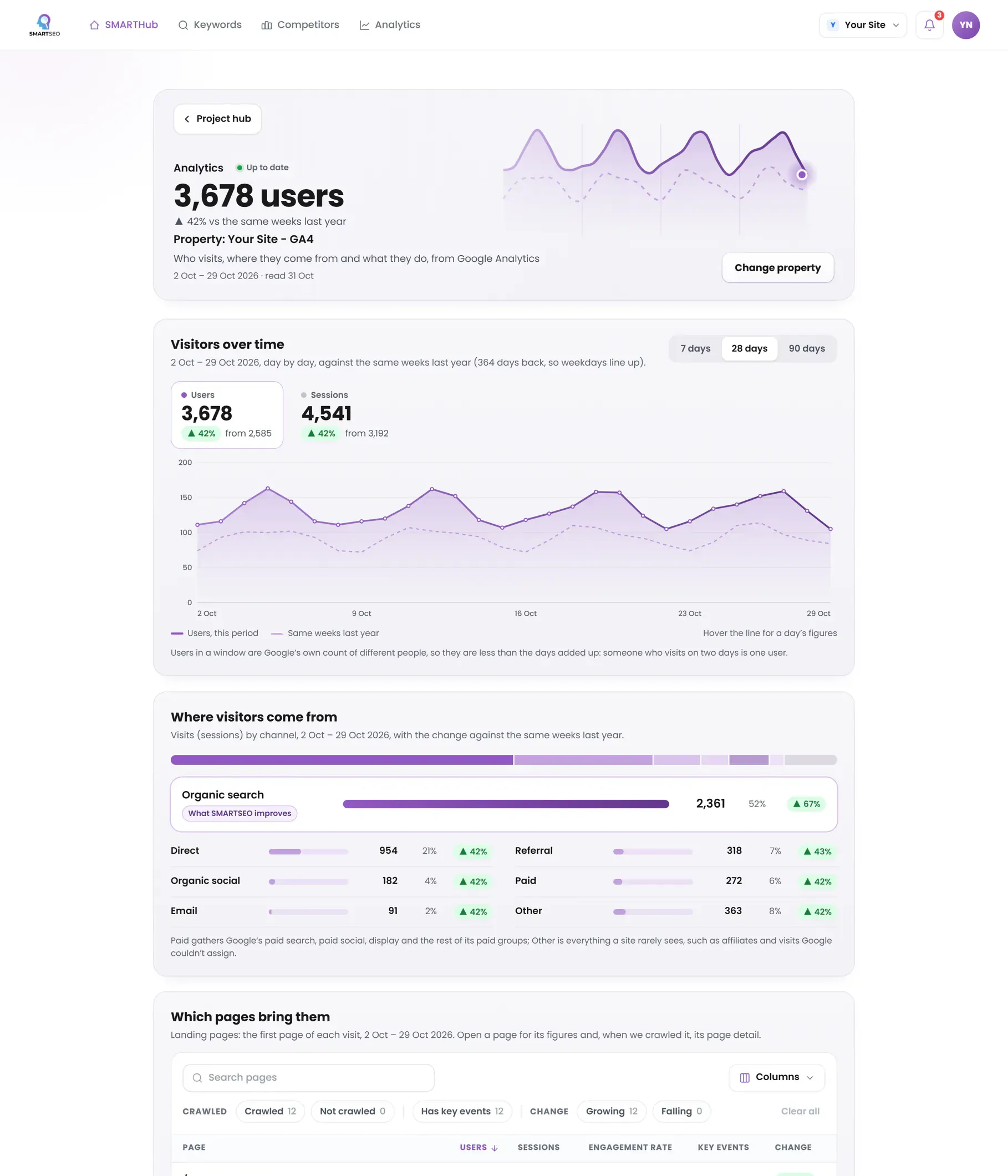
Connect Google Analytics and Search Console to SMARTSEO and see your traffic and top pages in plain words: visits from organic search compared with the same weeks a year earlier, the channels and landing pages that bring people, your sales if you sell online, and the pages Google shows often that few people click. Each section says when its data couldn’t be read rather than showing a zero.
Before and after: tracking a quote form
Example for illustration; not a client's data.
The problems we find most often
Each of these is a check SMARTSEO runs on every scan, in the words the app uses. The last ones come from hands-on work, outside what the app checks. Open one to see what triggers it and how to fix it.
NoticePages Google didn't show in search
- What triggers it
- Search Console recorded no impressions for a page we crawled in 28 days.
- Why it matters
- These pages can be indexed, as far as our crawl can tell, but Search Console recorded no impressions for them in 28 days. Google may not have indexed them, or shows a different address for the same content.
- How to fix it
- Check each one with URL Inspection in Search Console. Improve, merge or remove pages that don't earn a place.
WarningPages Google shows often but few people click
- What triggers it
- Google showed a page at least 100 times on page one in 28 days, and fewer than 2 in 100 people clicked.
- Why it matters
- Google already puts these pages on the first page of results, but fewer than 2 in 100 people who see them click. The title and description are what they judge it by.
- How to fix it
- Rewrite the title and meta description so they say plainly what the page offers for the searches it appears for (see them on Keywords).
ErrorNo conversions defined
- What we see
- GA4 reports traffic but no key events, so no report says which channel brings customers.
- Why it matters
- Reports can't say which pages or campaigns lead to enquiries, and Google Ads can't optimize for them.
- How to fix it
- Decide the few actions that matter (a purchase, a lead form, a call), send them as events and mark them as key events.
ErrorThe tag installed twice
- What we see
- Pageviews roughly double overnight, or engagement looks impossibly high, after a plugin or theme change.
- Why it matters
- Every page view or purchase is counted twice, so engagement and revenue look better than they are.
- How to fix it
- Check the page source and Tag Assistant for two Google tags or two GA4 configurations on the same page, and keep one, ideally in Google Tag Manager.
ErrorEcommerce events with the wrong names
- What we see
- Custom names such as “checkout_complete” instead of GA4's recommended purchase, add_to_cart and begin_checkout.
- Why it matters
- GA4's ecommerce reports only fill in from the recommended names and parameters.
- How to fix it
- Push the recommended events from the data layer, with items, value and currency.
WarningData retention left at two months
- What we see
- The property keeps event-level data for the default two months.
- Why it matters
- Explorations can't compare this quarter with the same quarter last year.
- How to fix it
- Raise retention to the longest period your plan allows, and note the date you changed it.
WarningInternal traffic counted
- What we see
- Visits from your own team and agencies are counted with your customers'.
- Why it matters
- On a small site, a few people testing forms can make up a large share of enquiries.
- How to fix it
- Define internal traffic in GA4 and activate the filter after checking it in test mode.
NoticeConsent choices not passed to tags
- What we see
- A cookie banner is shown, but tags fire the same way whatever the visitor chooses.
- Why it matters
- Tracking may not respect the visitor's choice, and Google's modelled data can't fill the gaps.
- How to fix it
- Set up consent mode in Tag Manager so each tag reads the visitor's choice before it fires.
CommonYour own payment page as a top referrer
- What we see
- PayPal, Stripe or your booking tool appears as a source of conversions.
- How to fix it
- Add those domains to GA4's list of unwanted referrals, so the visit keeps the source that really brought the customer.
CommonUnassigned and direct traffic swallowing the rest
- What we see
- A large share of visits arrive as Direct or Unassigned, especially from email and social.
- How to fix it
- Tag every campaign link with UTM parameters in a consistent format, and check GA4's channel rules match how you name them.
CommonConsent that switched tracking off
- What we see
- Traffic drops sharply the day a cookie banner goes live, with no change in sales.
- How to fix it
- Set up Consent Mode properly so tags respect the visitor's choice while Google can still model what consent hides, and document the date of the change.
A new site's search numbers, read honestly
Our own site is new, and its search figures say so: Search performance earned only a small part of its share of the SMARTSEO Score. Bing, read separately and never added to Google's numbers, showed non-brand searches finding us on its first page, but with only a couple of clicks in four weeks.
SMARTSEO’s own project for its own site, read from stored data on October 28, 2026.
That's the point of reading the numbers before acting on them: a good average position with almost no clicks says the searches are small or the snippet isn't winning the click, not that the work is done.
In this section
Questions people ask
What is the difference between Google Analytics and Search Console?
Search Console reports how your site appears in Google Search: searches, impressions, clicks and position. Google Analytics reports what people do on your site, from every source. They answer different questions, and you need both.
Why don't GA4 and Search Console agree?
They count different things. Search Console counts clicks on Google's results; GA4 counts sessions on your site, and only for visitors whose browser ran the tag. Expect them to move together, not to match.
Do I need Google Tag Manager?
Not for GA4 alone, but almost every site ends up with more tags: ads, conversion pixels, heatmaps. Tag Manager keeps them in one place, versioned and testable, without editing the site for each change.
Why don't my GA4 numbers match my ad platforms?
They count different things in different ways: ad platforms credit conversions to their own ads, often including views; GA4 credits the visit's source by its own attribution model. Pick one source of truth per question and use it consistently.
Is GA4 accurate?
As accurate as its setup. Consent choices, ad blockers and privacy features mean it never sees every visitor, and a misconfigured tag can double or hide data. Clean setup and a known baseline matter more than the absolute numbers.
What should a small business track?
Where visitors come from, which pages they land on, and the two or three actions that make you money. Everything else is optional until those are right.
What we do for you
- GA4 and Google Tag Manager set up properly
- A data layer your developers can maintain
- Conversion and ecommerce tracking, checked end to end
- An audit of what you track today and what's broken