
On this page
What an SEO audit is
An SEO audit reads your site the way a search engine does, page by page, and lists everything that stops a page being found, understood or shown. Most of it is invisible from the page itself: a status code, a header, a canonical tag, a redirect that goes through three addresses before it lands.
It starts with the technical foundations, because they gate everything else: content Google can’t fetch, or fetches at the wrong address, can’t rank however good it is.
The point of an audit is not the length of its list. It is the order.
A site-wide robots.txt block outweighs a hundred missing alt texts, and a good audit makes that obvious.
How an audit runs
What we check, in order
1. Can Google reach the site? robots.txt must not block Googlebot from the whole site, and it must answer. Google treats a robots.txt that returns a server error as “crawl nothing” at first, and a missing one (a 404) as “crawl everything”. Then the server: pages that answer with 5xx errors, or time out, are pages Google can’t read.
2. Is there one version of the site? http:// should redirect to https://, and either www or the bare domain should redirect to the other. If both versions load, every page exists twice.
3. Do addresses answer honestly? A page that has moved should redirect permanently, in one hop. Chains of redirects cost each visitor a wait; loops never reach a page at all. A made-up address should answer 404: a site that answers 200 to everything creates “soft 404s” Google may index.
4. Can Google read each page? Noindex tags, canonicals and server headers, page by page. This is where the hidden problems live.
5. Then on-page and content, covered in SEO services.
Before and after: a redirect chain
Example for illustration; not a client's data.
How to check it yourself
- Read your robots.txt.
Open yoursite.com/robots.txt in a browser and read it.
- Check there is one version.
Type your address with http://, with and without www, and check that each lands on the one version you use.
- Test a missing page.
Type a nonsense address and see what the browser's developer tools say the status code is.
- Read Google's own view.
In Search Console, open Pages under Indexing. Every reason a page isn't indexed is listed with example addresses. Then use Search Console's URL Inspection on your most important page.
- Crawl the site.
A crawler lists status codes, redirects, titles and internal links for every page. Sort by status first, then by duplicate titles.
- Write the plan in order.
Crawl and index blockers first, then pages competing with each other, then titles on pages that already get impressions.
For everything else, SMARTSEO reads your site the way a search engine does, once per scan, and checks each of the problems below. A request that got no answer is reported as unknown, never as a pass.
The problems we find most often
Each of these is a check SMARTSEO runs on every scan, in the words the app uses. Open one to see what triggers it and how to fix it.
Errorrobots.txt blocks all crawling
- What triggers it
- robots.txt disallows the whole site for Googlebot.
- Why it matters
- Your robots.txt tells Google not to crawl any page on the site, so it can't read your content.
- How to fix it
- Remove the site-wide Disallow: / from robots.txt, unless you mean to keep the whole site out of search.
Errorrobots.txt returns a server error
- What triggers it
- robots.txt answers with a 5xx error, or doesn’t answer.
- Why it matters
- When robots.txt answers with a server error, or doesn't answer, Google treats the whole site as off limits at first and stops crawling it.
- How to fix it
- Make /robots.txt return 200, or 404 if you have none.
ErrorPages returning a server error (5xx)
- What triggers it
- A page answered with a 500-range server error.
- Why it matters
- Your server failed to send these pages, so neither visitors nor Google could read them. It's a different fix from a missing page.
- How to fix it
- Fix the server error; if it comes and goes, check your hosting capacity.
WarningRedirect chains (2 or more hops)
- What triggers it
- Reaching a page takes two or more redirects in a row.
- Why it matters
- Each hop in a chain adds a wait before the page loads. Google follows up to 10 hops, but a long chain is slower for everyone and easy to break.
- How to fix it
- Redirect the first address straight to the final one.
ErrorRedirect loops or too many redirects
- What triggers it
- Redirects go round in a circle, or past the limit, and never reach a page.
- Why it matters
- These addresses never reached a page: they loop back on themselves, or pass through more than 5 redirects, where we stop following. Visitors see an error.
- How to fix it
- Break the loop, or shorten the chain, so each address ends on a live page.
WarningThe http:// version of your site doesn't redirect to https://
- What triggers it
- Asking for your http:// homepage doesn’t end on https://.
- Why it matters
- Anyone who types or follows an http:// address gets the insecure version, and Google sees two copies of your homepage.
- How to fix it
- Redirect every http:// address to its https:// version with a 301.
WarningBoth the www and non-www versions of your site load
- What triggers it
- Both www and non-www load a copy of your site instead of one redirecting to the other.
- Why it matters
- Your homepage loads at both addresses, so every page can exist twice and links to the two copies are split between them.
- How to fix it
- Pick one and 301-redirect the other to it.
WarningMissing pages don't return 404
- What triggers it
- A made-up address on your site answers 200 instead of 404.
- Why it matters
- We asked for an address that cannot exist and your server answered as if the page were there. Google may spend visits on such pages or even index them.
- How to fix it
- Make addresses that have no page answer 404 (or 410).
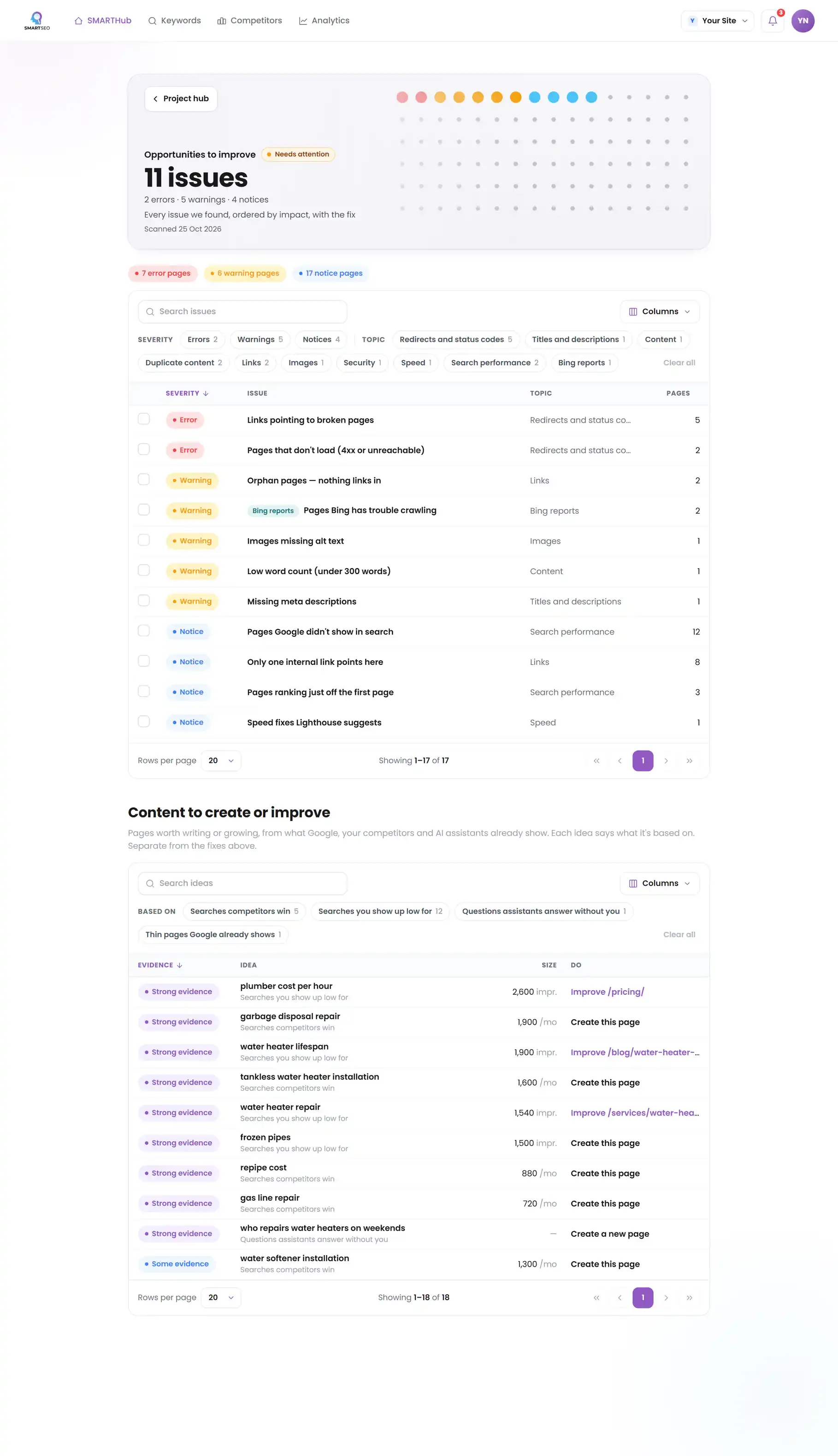
Our own audit
The errors on our WordPress site were a broken address and the pages that still linked to it. The warnings that touched every page came from the theme: links with no text, a server slow to answer, and HTML so heavy most pages were over the size we flag. None of that shows in the page you see, which is why an audit reads the code, not the screen.
SMARTSEO’s own project for its own site, read from stored data on October 28, 2026.
Questions people ask
How often should I audit my site?
Run a full audit before and after any redesign, migration or platform change, and check the essentials monthly. Most damage comes from changes: a plugin update, a new template, a staging setting copied to the live site.
What is the difference between an SEO audit and a site audit?
They overlap. A technical SEO audit asks whether search engines can crawl, index and trust your pages. A wider site audit adds content, conversion and analytics. We start with the technical part, because nothing else counts until it passes.
Is a free SEO audit tool enough?
It finds the problems; it doesn't decide which matter for your business or fix them. Use one to see the list, then judge each finding: some are deliberate, like a noindexed thank-you page, and a good tool says so rather than calling it an error.
What should an audit deliver?
A list ordered by impact, each item with the pages affected, why it matters and how to fix it, and a way to confirm the fix. A thick PDF of every possible warning is not an audit; it is a crawl export.
Will an audit improve my rankings by itself?
No. An audit tells you what to fix; rankings move when the fixes are made and Google has recrawled the pages. A rescan confirms each fix.
What is the difference between an SEO audit and SEO services?
The audit finds and orders the work. SEO services are the work itself: rewriting titles and pages, fixing redirects and structured data, building the content plan.
What we do for you
- A full technical audit with a plan ordered by impact
- Redirect maps for migrations and redesigns, so no ranking is lost
- robots.txt, sitemap and canonical fixes
- Server, HTTPS and hosting changes made with your developer or host
- A rescan after each fix, so you know it worked