

On this page
What web development is
Two sites can look identical and perform completely differently because of how they’re built.
It matters because the build sets the limits for everything else. It decides how fast pages arrive, whether search engines and AI tools can read them, whether the site stays up under load, and how easily you can change titles, redirects and content later.
Rendering: what arrives in the first response
Static generation and server-side rendering both send complete HTML. Single-page apps can, with server rendering added.
Whatever the framework, the test is the same: view the page with JavaScript off and check the main content is there.
Server speed
Before the browser can show anything, the server has to respond. Slow responses usually come from building each page on every visit: a database query, a theme, a dozen plugins. Caching full pages, serving them from a content delivery network (CDN) close to the visitor, and keeping work out of the request make responses fast and predictable.
Page weight and compression
Every byte has to travel to the visitor’s device and be processed there. Heavy images, unused CSS and JavaScript from themes and plugins, and multiple web fonts add up quickly on mobile. Compress HTML, CSS and JavaScript with gzip or Brotli on the server, remove code you don’t use, and load non-essential scripts after the page has rendered.
Security and reliability
Serve every page over HTTPS and redirect HTTP to it. Send the Strict-Transport-Security header so browsers never try the insecure version. Return honest status codes: 404 for missing pages, 301 for moved ones, and never a 200 for an error page. Keep software and plugins updated, because a hacked site loses trust, and search visibility, fast.
Before and after: response headers
Example for illustration; not a client's data.
How to check it yourself
- View the source.
Open a page, view its source (not the inspector), and search for a sentence from the main content. If it isn't there, the page depends on JavaScript.
- Run PageSpeed Insights.
Then run the page through PageSpeed Insights: the diagnostics show the server response time and total page weight.
- Check your response headers.
Finally, check your response headers with your browser's developer tools, Network tab: look for content-encoding (compression) and strict-transport-security.
SMARTSEO checks every page it reads for content that needs JavaScript, empty app shells, uncompressed HTML, slow responses and heavy pages, checks your site’s security headers, and measures your homepage’s speed on mobile and desktop.
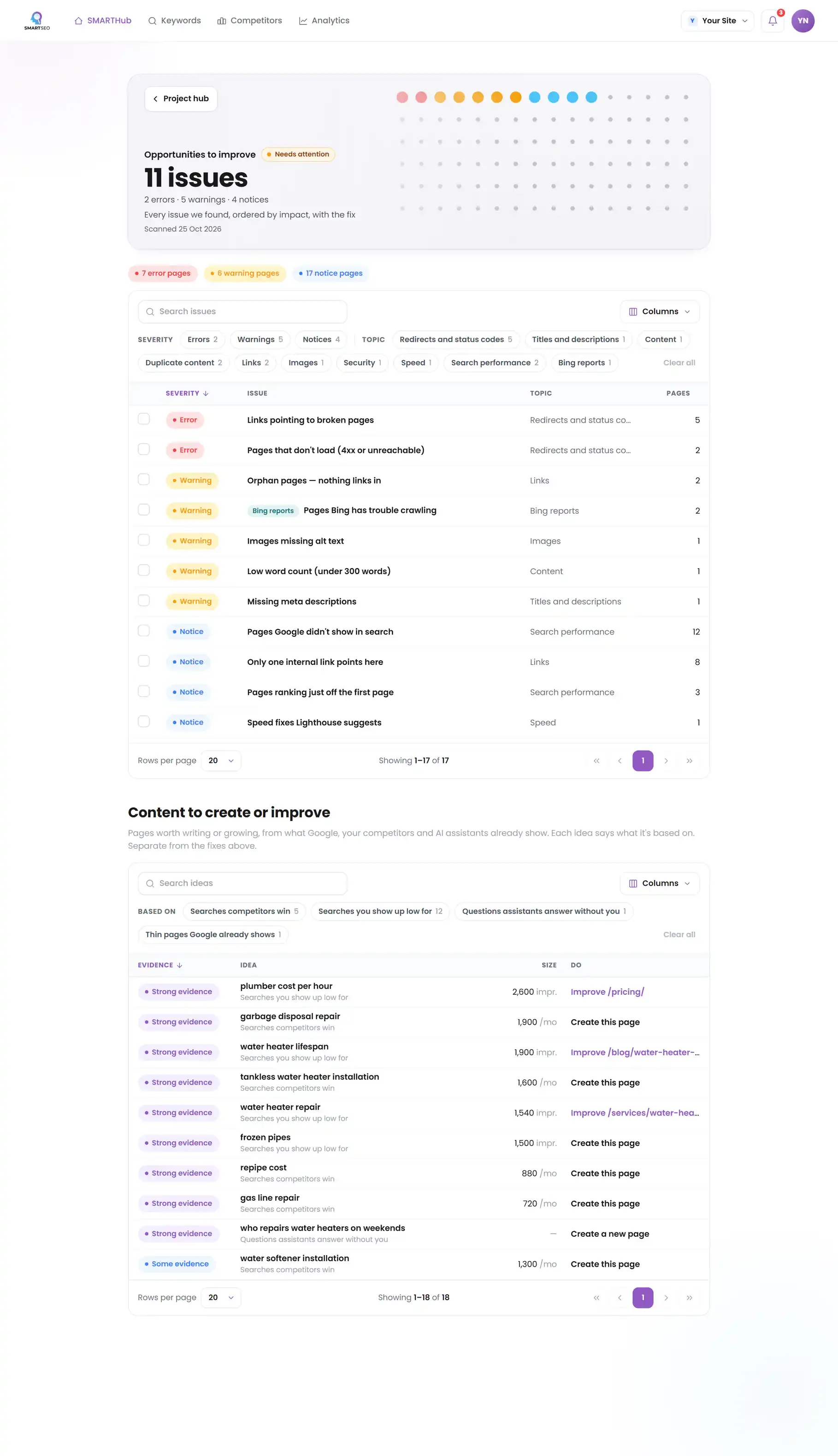
The problems we find most often
Each of these is a check SMARTSEO runs on every scan, in the words the app uses. Open one to see what triggers it and how to fix it.
WarningPage shows almost no text before JavaScript runs
- What triggers it
- A live page has fewer than 50 words before JavaScript runs.
- Why it matters
- We found fewer than 50 words in the page as your server sends it. Google can run JavaScript, but content that only appears after it runs is slower and less reliable to index. We could not see the text; that doesn't prove Google can't.
- How to fix it
- Render the main content on the server, or check the page in Search Console's URL Inspection to see what Google sees.
NoticePage is an empty app shell
- What triggers it
- A page sends little more than a script tag and an empty container.
- Why it matters
- The page as your server sends it is an empty app container plus scripts. Google can run JavaScript, but content that only appears after it runs is slower and less reliable to index. We could not see the content; that doesn't prove Google can't.
- How to fix it
- Render the main content on the server, or check the page in Search Console's URL Inspection to see what Google sees.
NoticePages sent without compression
- What triggers it
- Pages over 10 KB are sent without gzip or Brotli compression.
- Why it matters
- The server sent these pages uncompressed, so they take longer to arrive, most of all on mobile connections.
- How to fix it
- Turn on gzip or Brotli compression on your server or CDN.
NoticeServer responds slowly
- What triggers it
- Your server takes more than 600 ms to answer for a page (counted when it happens on at least 3 pages).
- Why it matters
- These pages took more than 600 ms to start answering when we crawled. It's one sample from our server, not Google's, but a slow start delays everything after it.
- How to fix it
- Look at your hosting, page caching and database time.
WarningHeavy pages (large HTML)
- What triggers it
- A page’s raw HTML is over 200 KB before any images or scripts.
- Why it matters
- Slow pages lose visitors before they read anything, and speed is a confirmed ranking signal.
- How to fix it
- Reduce inline scripts, styles and markup bloat so the HTML document stays well under 200 KB.
NoticeNo HSTS header
- What triggers it
- Your site doesn’t send the Strict-Transport-Security header.
- Why it matters
- Your homepage doesn't send a Strict-Transport-Security header, which tells browsers to use https:// every time. It hardens security; it is not a ranking factor.
- How to fix it
- Once every page works over https://, send a Strict-Transport-Security header.
Why we rebuilt this site as static pages
SMARTSEO's read of our old WordPress site found every page slow to respond and most of them heavy. Our homepage scored well in Lighthouse on desktop but much worse on mobile, and Google had no real-visitor speed data for it at all, so the lab test was the only measure we had.
SMARTSEO’s own project for its own site, read from stored data on October 28, 2026.
We rebuilt it as static pages served from a CDN: no database on each visit, no theme or plugin scripts, and the tag manager started only after the page has loaded. The next scan reads the new site.
Questions people ask
Does the platform matter for SEO?
Less than how it's used. WordPress, Shopify, a static site generator or a custom framework can all rank well. What matters is that pages are served as HTML with their content, respond quickly, stay light, and that the platform doesn't stop you controlling titles, redirects and structured data.
Can Google read JavaScript sites?
Google can render JavaScript, but later and with less certainty than plain HTML, and many other crawlers and AI tools don't run scripts at all. Server-side rendering or static generation gives every reader the content on the first request.
What is a good server response time?
Aim for the first byte of HTML in well under a second. Caching full pages, serving from a CDN and avoiding slow database queries on each visit are the usual fixes.
What should I check before launching a new site?
That every old address redirects, pages return the right status codes, robots.txt and noindex tags aren't left over from staging, the sitemap lists the new addresses, HTTPS is forced, and analytics fires once on every page.
What we do for you
- Fast builds: static, server-rendered or headless, chosen for your site
- Speed work on an existing site: server, caching, images and scripts
- Launch checks and migrations that keep your rankings
- Security headers, HTTPS and the technical SEO basics, done right